The classroom dashboard for computer science
See what your class is doing, as it happens.
TeachX brings live code monitoring, self-grading tests, attendance, feedback and course material together in one dashboard. Built by a computer science teacher and used in class every day.
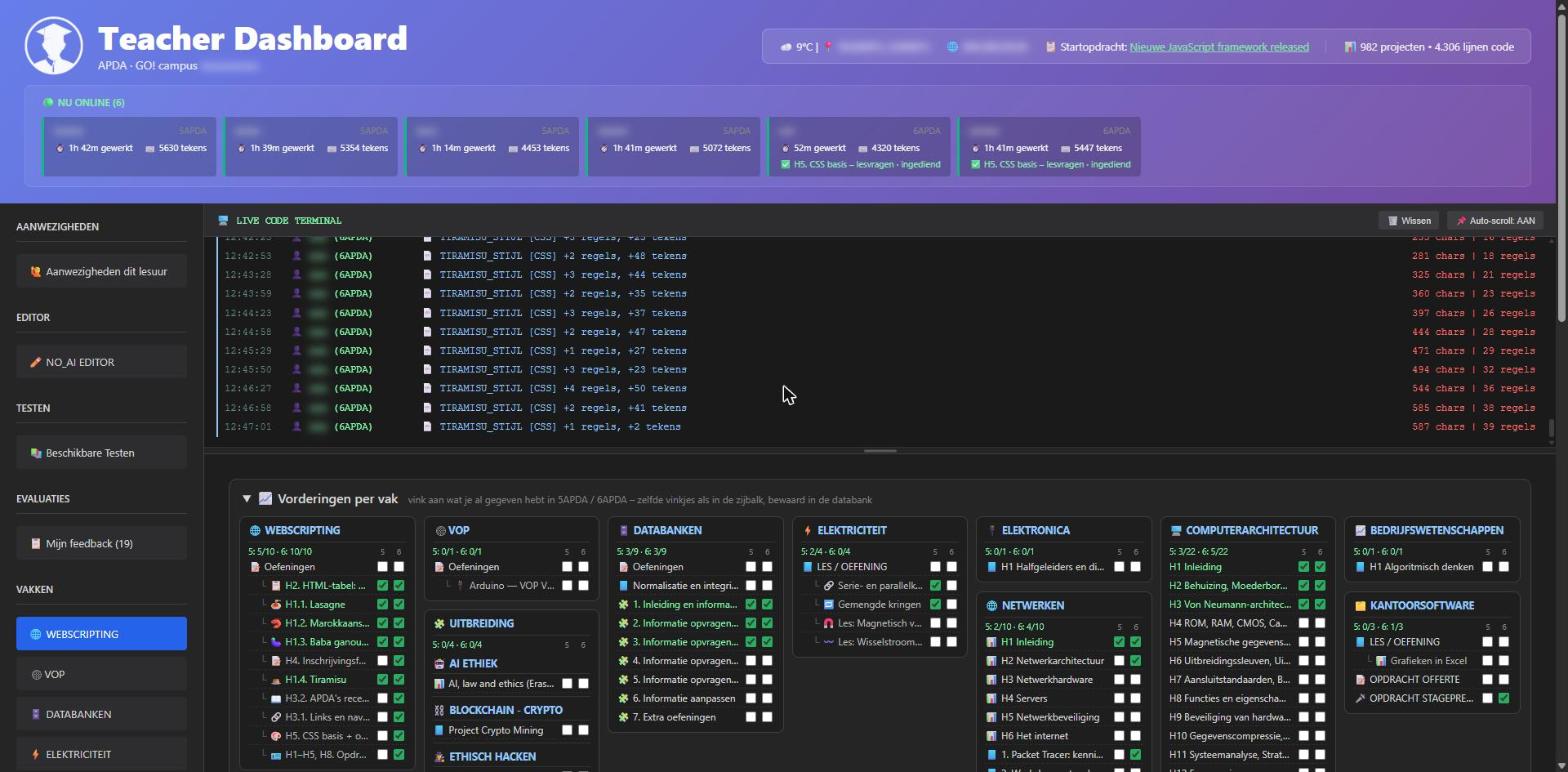
Screenshots from a real lesson. Names of students, teacher and school have been blurred.
Live monitoring
The live code terminal shows, for every student, which lines and characters are added, in which project and which file.
Who is working
At the top you see who is online, how long they have been working and how much they have typed.
Their own work, without AI
Students code in the NO_AI editor. Their code is saved automatically and you see how it comes together.
Everything you need during and after class
From the first bell to the report card: TeachX takes over the paperwork, so you can teach.
Attendance
Attendance in one click
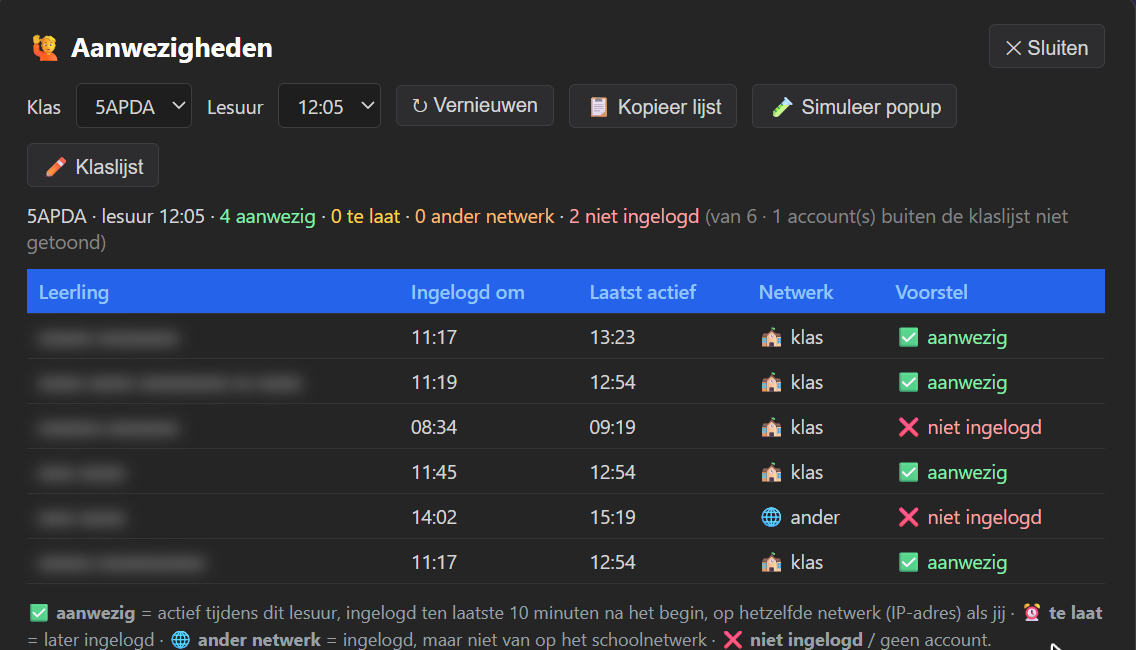
For every lesson TeachX suggests an attendance list based on who logged in, when, and from which network.
- Status per student: present, late, other network or not logged in
- Pick class and lesson, refresh and copy the list
- You decide: it stays a suggestion that you confirm
Tests
Tests that grade themselves
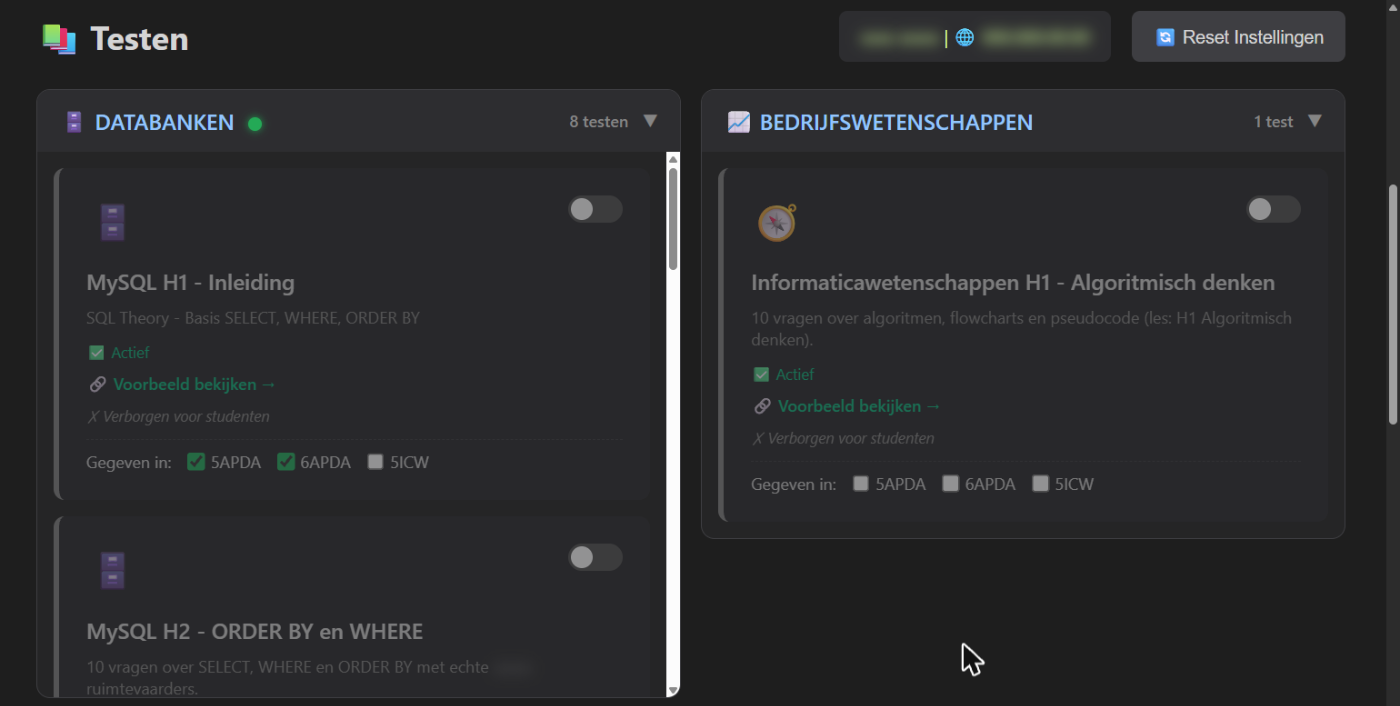
Prepare tests per subject and use a switch to decide when students see them. Tests are graded automatically.
- Tests grouped by subject, with a preview for the teacher
- On/off per test, and tick in which class the test was given
- Open the answer key for students separately
- Direct links don't work: a test only opens through the dashboard
Results
Grades without the maths
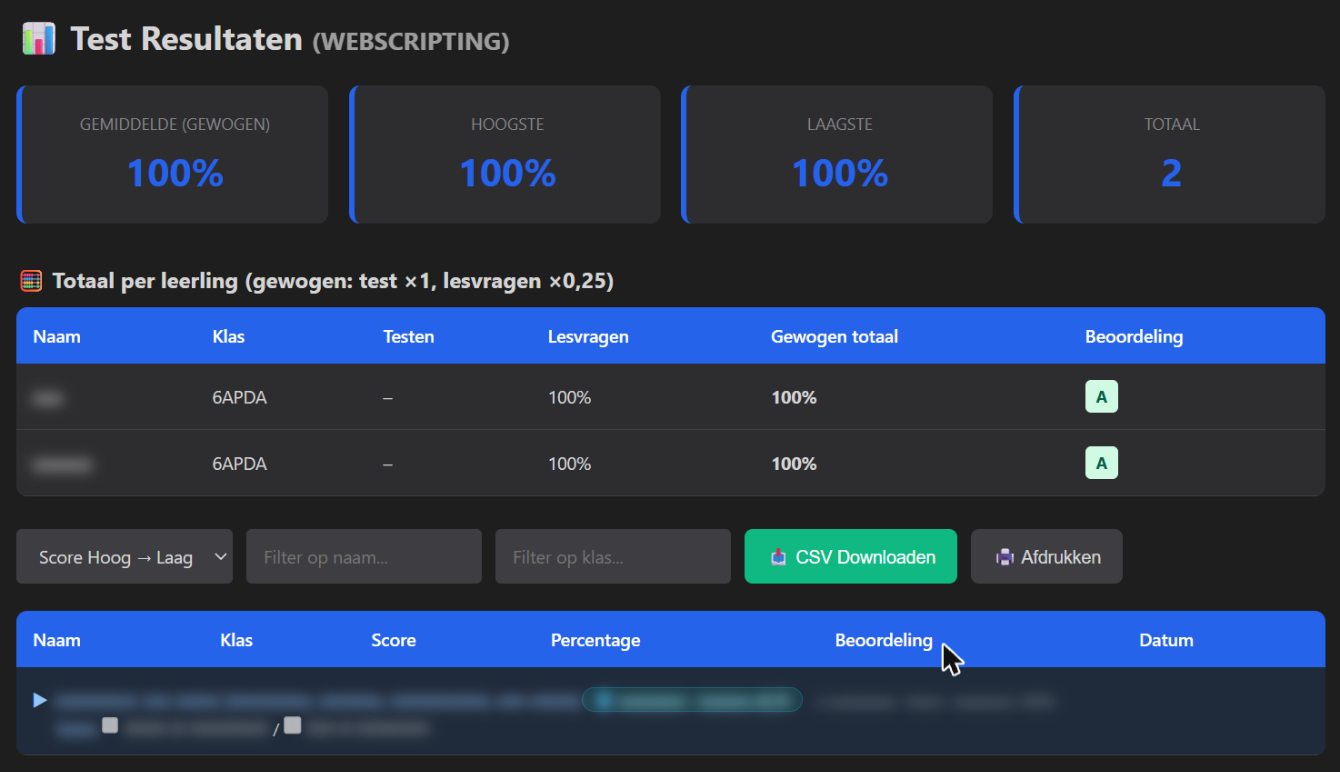
All results per student, with a weighted total of tests and lesson questions and a grade.
- Average, highest and lowest score at a glance
- Weighted total per student (test ×1, lesson questions ×0.25)
- Sort, filter by name or class
- Export to CSV or print
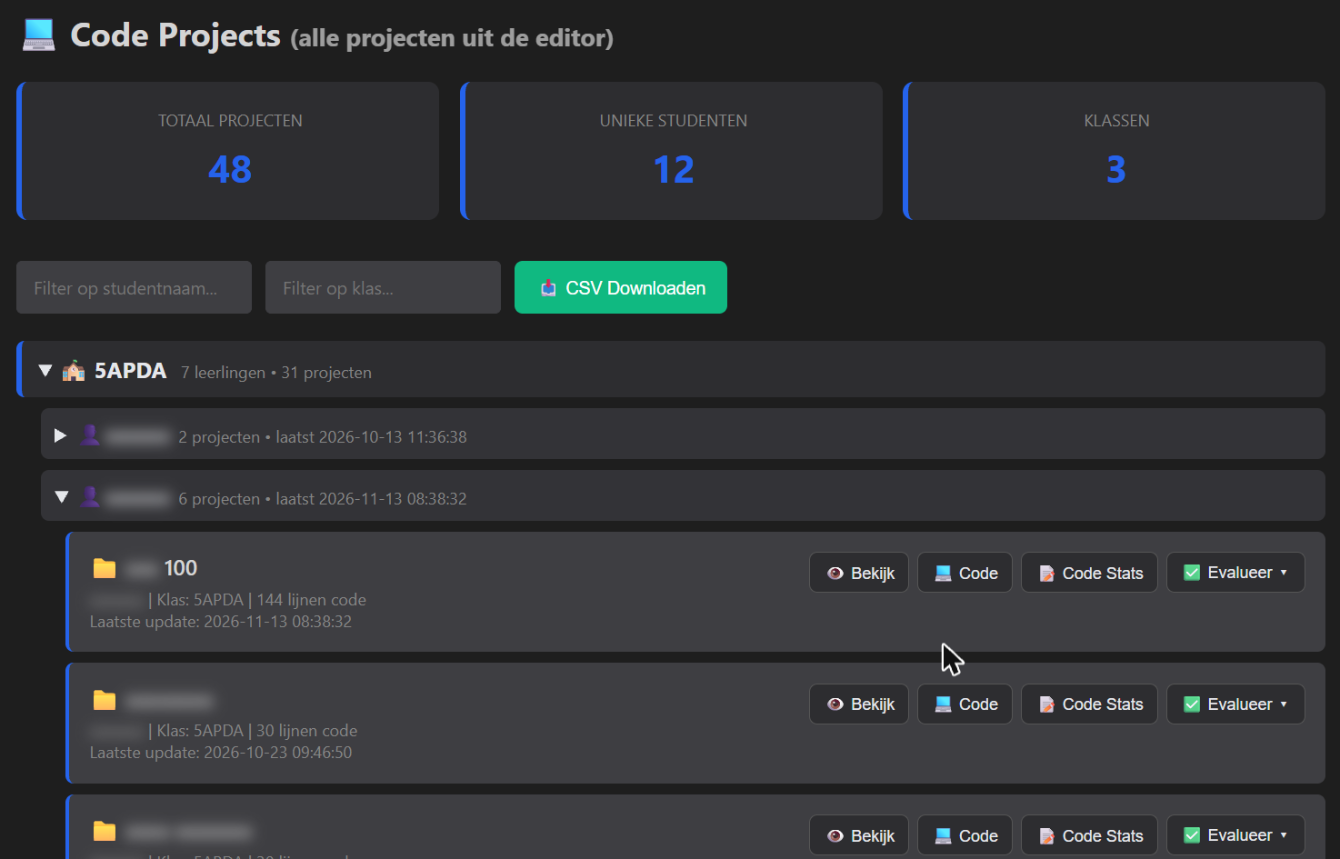
Code projects
Every project of every student
Everything students make in the editor is grouped by class and by student. Open the result, the code or the statistics, and grade right away.
- Projects per class and student, with last change
- View the page, read the code or open the code statistics
- Start grading straight from the project
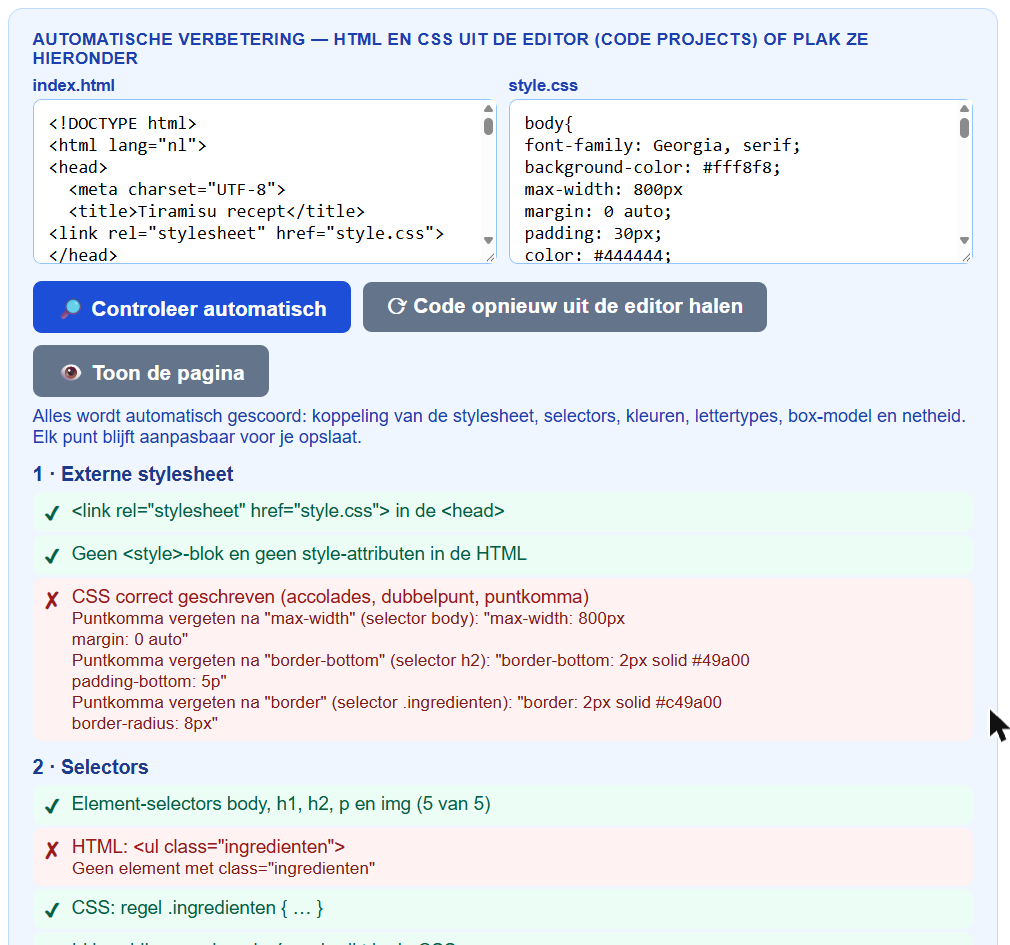
Automatic grading
An evaluation form that checks the code itself
The form pulls the HTML and CSS from the student's project and scores every criterion of your rubric automatically.
- Rubric with partial points per criterion
- One button: Check automatically
- Every point stays editable before you save
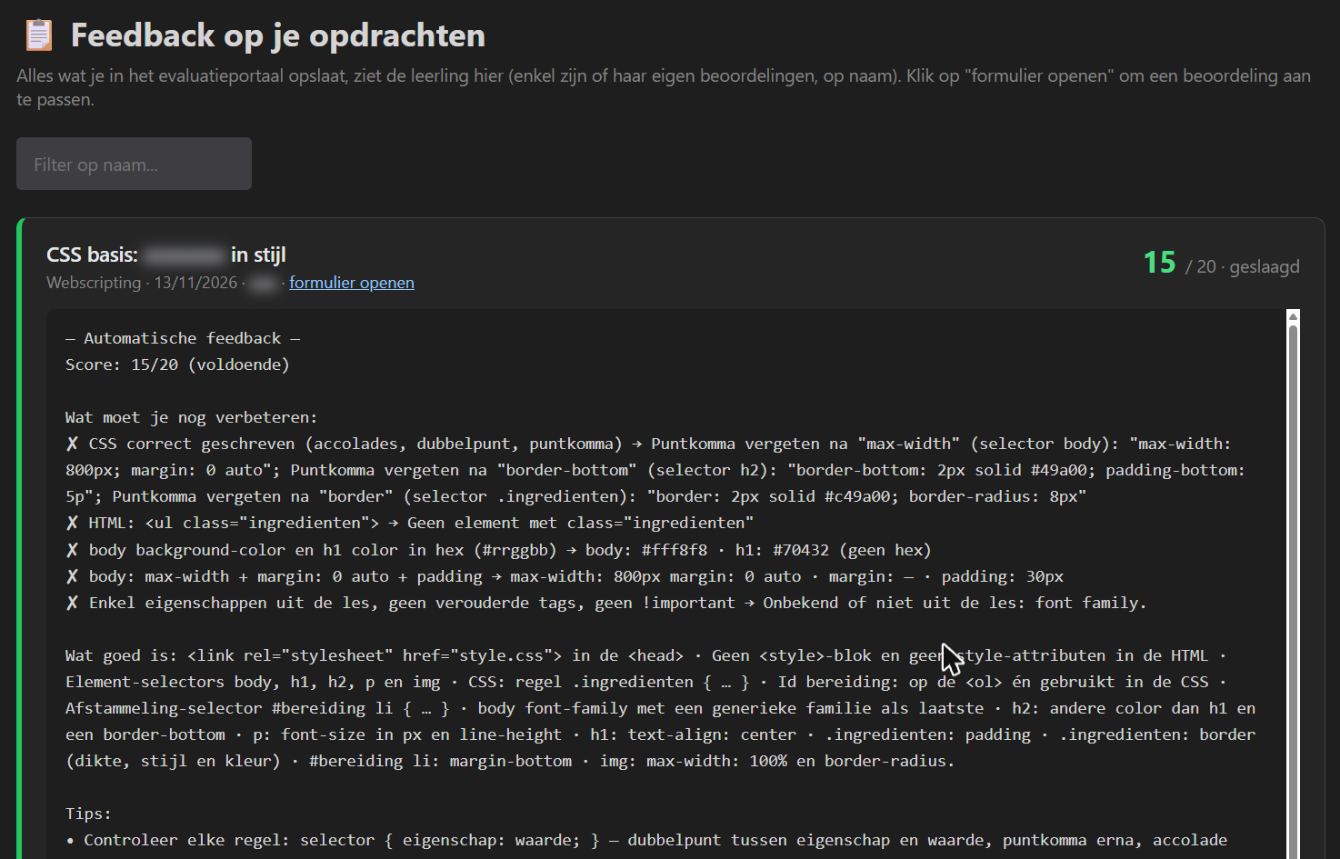
Feedback
Feedback students can act on
What you save in the evaluation form appears in the student's own dashboard: the score, what is good, what needs work and concrete tips.
- Every student only sees their own evaluations
- Per assignment: score, points to improve, strengths and tips
- As a teacher you reopen the form to adjust
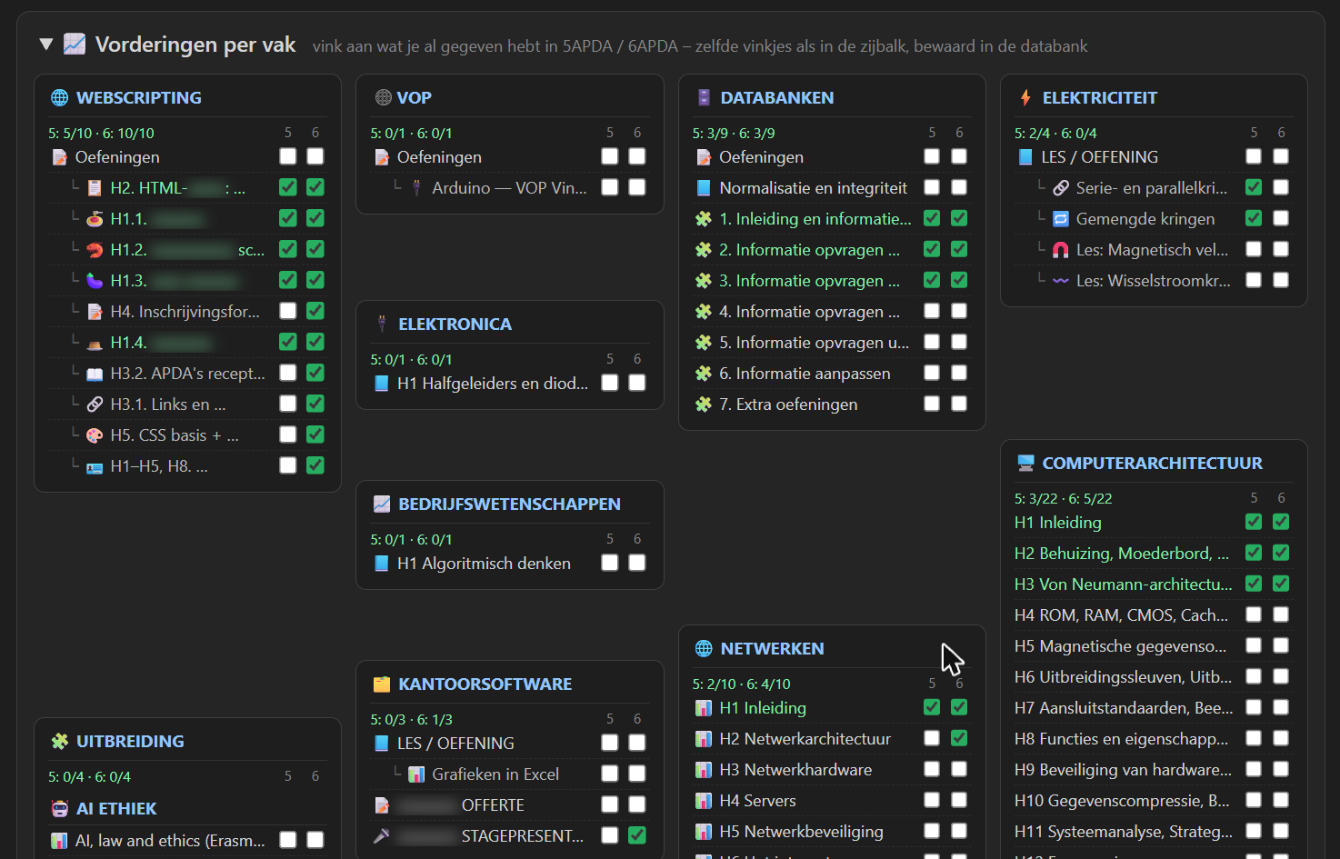
Progress
Know where every class stands
Tick off per subject and per class which lessons and exercises you have covered. The status is saved and also shown in the menu.
- All subjects side by side, with a counter per class
- Lessons, exercises and assignments in the same structure
- Annual plan per subject
Course material
Course and exercises in one place
Students find the lessons, exercises and assignments per subject in the menu, from web scripting and databases to networks and Arduino.
- Lesson pages with goals, explanations and step-by-step guides
- Your own subjects and chapters in the menu
- Shortcuts to external courses such as Dodona, Datacamp and Netacad
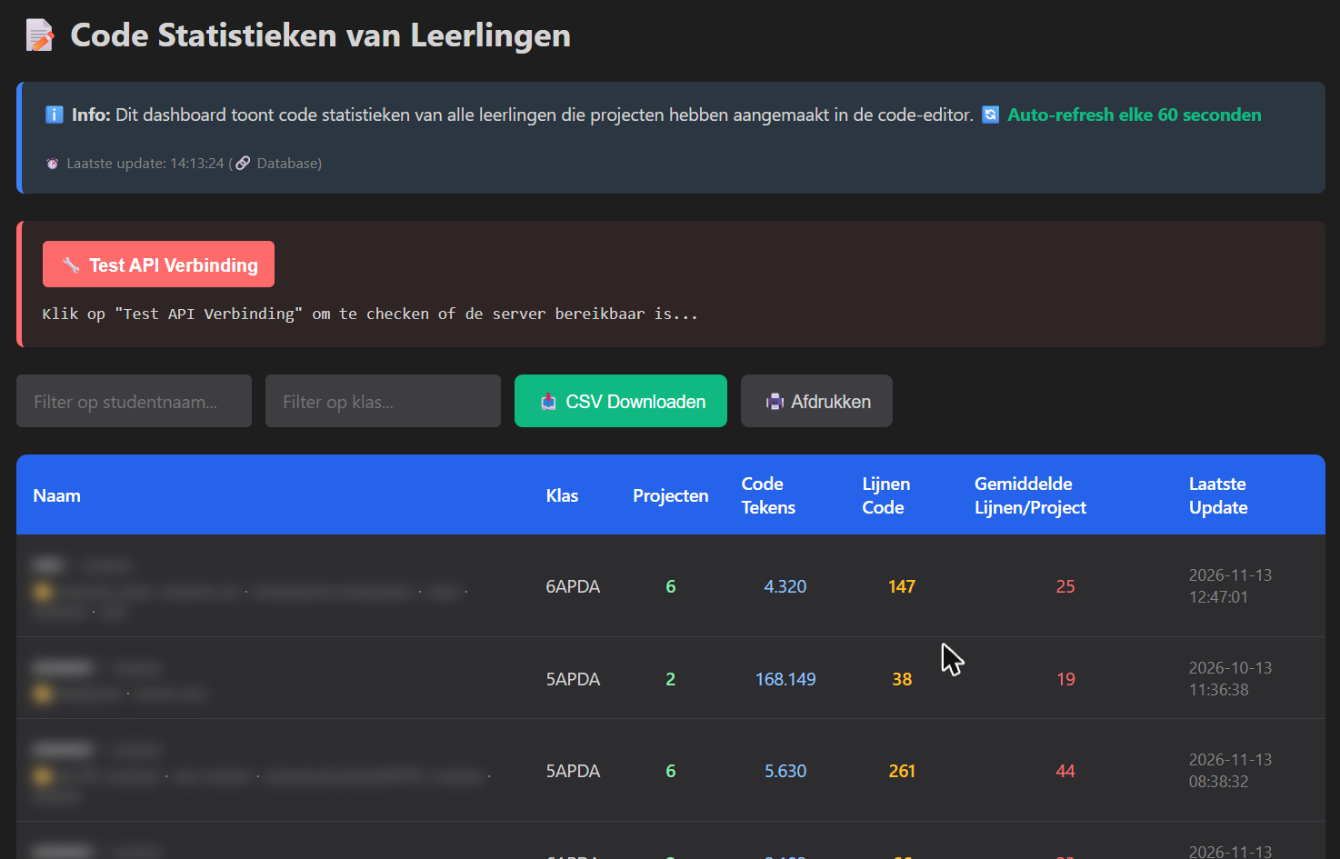
Code statistics
See who has written how much
Per student the number of projects, characters and lines of code, with the last update. One table shows who is making progress and who is stuck.
- Projects, characters and lines of code per student
- Filter by name or class
- Export to CSV or print
Everything at a glance
Live code terminal
Every change by every student appears with time, project, file and number of lines and characters.
Online now
Cards per student with time worked, characters typed and lesson questions submitted.
NO_AI editor
Browser-based code editor with tabs for HTML, CSS and JavaScript, without an AI assistant.
Autosave
Code is saved automatically in the database, with version history. Nothing is lost when the browser closes.
View, PDF and export
Students view their page in the browser and export their project or a PDF.
Attendance
Suggestion per lesson based on login, time and network.
Self-grading tests
Tests per subject that grade themselves and pass on the score.
Access control
Tests only open through the dashboard and only when you switch them on.
Answer keys
An answer key per test that you open separately for students.
Lesson questions
Short questions with a lesson, counted with their own weight.
Test results
Weighted totals, grades, sorting and filtering.
CSV and printing
Export or print results and statistics.
Code projects
All projects per class and student, with code and preview.
Code statistics
Projects, characters and lines of code per student.
Analytics
Score and grade distribution in charts.
Evaluation forms
Rubrics per assignment with automatic grading of HTML and CSS.
Feedback for students
Score, points to improve, strengths and tips per assignment.
Progress per subject
Tick off per class what has been covered.
Course material and annual plan
Lessons, exercises and annual plans per subject in the menu.
Internship competences
Internship competences in one place.
Starter task
A starter task at the top of the dashboard every lesson.
Self-correcting exercises
Exercises with the lesson that check step by step and remember progress. You see where the class gets stuck.
Fair play check
Large blocks of code that appear at once stand out, and the code in the editor is compared with what was submitted.
Mini-site checks
When a link is submitted, TeachX fetches the pages and checks them automatically.
Login security
Passwords are only stored encrypted, and logging in is temporarily blocked after too many failed attempts.
Roles and secure login
Separate views for teacher and student, with server-side sessions.
Assignments with uploads
Students submit photos, screenshots, Excel workbooks or Packet Tracer files. What can be measured is checked at once; images are assessed against a checklist.
Randomised tests
Every student gets different questions drawn from a pool per topic, so copying makes little sense. Always the same total score.
Drag-and-drop on a diagram
Students build a circuit or network by dragging parts to the right place. Graded automatically.
Interactive simulations
Lessons with animated diagrams: transistor, MOSFET, electric motor, left-hand rule. Students control them and see the effect at once.
Python without AI, with help when needed
Python lessons in small steps: first a hint, then the student can buy a piece of code for a small deduction.
Smartschool integration
Scheduled tests and the lesson plan go to the planner, grades to Skore and submitted work as a zip to the upload zone.
Active test at the top
When a test is open, everyone sees it at the top of the dashboard, with a blinking light.
Device recognition
If a student logs in on another student's device, the teacher gets a signal. Nothing is blocked: the teacher decides.
Log out everywhere
After a new password, all other sessions of that account are closed.
Forgotten password
Students request a reset link themselves, or the teacher creates one.
Worked solutions
Worked solutions per exercise, visible to the teacher only.
Curriculum goals and annual plan per programme
Lessons, exercises and tests are linked to the curriculum goals, with an annual plan per programme.
Who is TeachX for?
Computer science teachers
Less walking around and grading, more time for the student who is stuck. You see the work take shape and grade with one click.
ICT coordinators and school leaders
One browser-based platform for course material, tests and follow-up. Nothing to install on student devices.
Teachers of other subjects
Self-grading tests, course material, progress and results work for any subject. The platform is also used for subjects such as electricity, electronics and networks.
Students
One place for lessons, exercises, tests and feedback. Their work is saved automatically and they have a clear overview of all their tasks per subject.
How to start
We set up your school
You get your own environment with your classes and subjects.
Students log in
With their school email address, in the browser. Nothing needs to be installed.
You teach
You follow along live, open tests and give feedback from one dashboard.
Secure by design
Server-side sessions
Login uses sessions on the server, not data in the browser.
Roles
Teachers and students each see their own view. Students only see their own results and feedback.
Protected tests
Tests can only be reached through the dashboard, with temporary access.
No ads, no tracking
A session cookie to stay logged in and a device cookie for security. No ads, no analytics, no selling of data.
Pricing
Trial
In consultation with your school
Try TeachX with one class.
- Full dashboard
- One class
- Help getting started
School licence
Price on request, per school year
For all computer science classes and teachers.
- All features
- Tailored to your school
- Your own subjects and course material
- Support and training
Frequently asked questions
Do students need to install anything?
No. TeachX runs entirely in the browser, including the code editor.
Can I add my own subjects and lessons?
Yes. The menu follows your subjects, chapters, exercises and annual plan. We set up your subjects and lessons together with you.
Which tests are graded automatically?
Tests with questions per chapter, self-correcting exercises and HTML and CSS assignments through the evaluation form. Automatic grading is always a suggestion: the teacher decides the final score.
Does it work with Smartschool?
Yes. TeachX works alongside Smartschool: attendance, scheduled tests, grades and submitted work can be passed on to the planner, Skore and the upload zone.
Privacy and data
Which student data does TeachX process?
Name, school email address, class and role; the code and projects from the editor; editor activity (per file the number of characters and lines and the time); test answers and scores; evaluations and feedback; and technical data such as IP address and login attempts. For assignments, students upload photos or screenshots of their own work (for example a network setup). No sensitive data is requested, and no photos or videos of the students themselves.
Do students know their work is monitored?
Yes. The terms of use, which every student accepts, explain in plain language what is recorded and why: the editor records how much code is written when, so the teacher can see that the work is the student's own. Classmates never see each other's code or grades.
How long is data kept?
Editor activity logs are deleted every night. Code, results and evaluations are kept as long as needed for the school year. Accounts are deleted when a student leaves the programme or the school. The exact retention periods are agreed with the school.
Who is responsible for the data?
The school remains the controller for student data, which is processed as part of its educational task. TeachX processes the data on behalf of the school, under a data processing agreement with the school.
Is data shared or used for advertising?
No. The data is used only for teaching, follow-up and assessment. It is not sold and not used for advertising. Only the processors that are needed (hosting and, if the school wants it, an AI assistant for grading) get access, under a data processing agreement. There are no advertising or tracking cookies: only a session cookie to stay logged in and a device cookie that is only used to see whether an account is used on another student's device.
Where is the data stored and how is it protected?
On the RUBBERDUCK.BE server. Passwords are only stored as an encrypted hash, logging in is temporarily blocked after too many failed attempts, and nothing is stored in the student's browser apart from those two cookies. Uploads are stored outside the public web folder and are only visible to the student and the teacher.
Is AI used?
Students work without AI: that is the whole point of the NO_AI editor. Open questions and screenshots can be assessed by an AI assistant (Claude by Anthropic) using the teacher's rubric; the student sees the explanation per criterion. If the school prefers not to, the teacher grades them.
Is TeachX GDPR compliant?
TeachX is built on the principles of the GDPR: only the data needed for teaching, role-based access, hashed passwords, server-side sessions, activity logs deleted every night, no tracking and uploads outside the public web folder. The school remains the controller; together we agree on retention periods, the data processing agreement and, where needed, a data protection impact assessment (DPIA).
What rights do students and parents have?
Access, rectification and in some cases erasure of their data, as the GDPR provides. They contact the school, and we help the school carry out such a request.
Want to see TeachX in your own class?
Request a demo. We show you the dashboard with your subjects and answer your questions.
Email info@rubberduck.be